




项目概述
Tencent/rapidjson 是一个高效的 C++ JSON 解析和生成库,支持 SAX 和 DOM 风格的 API,旨在提供快速的数据处理能力,适用于需要高性能 JSON 操作的应用场景。
项目地址
https://github.com/Tencent/rapidjson
项目页面预览

关键指标
- Stars:14957
- 主要语言:C++
- License:Other
- 最近更新:2025-02-05T13:28:08Z
- 默认分支:master
本站高速下载(国内可用)
点击下载(本站镜像)
– SHA256:45657e20a02417e4d874a7861c7e3fc00cd03f83344bd20f4c894483a7336b4c
安装部署要点(README 精选)
Installation
RapidJSON is a header-only C++ library. Just copy the include/rapidjson folder to system or project’s include path.
Alternatively, if you are using the vcpkg dependency manager you can download and install rapidjson with CMake integration in a single command:
* vcpkg install rapidjson
RapidJSON uses following software as its dependencies:
* CMake as a general build tool
* (optional) Doxygen to build documentation
* (optional) googletest for unit and performance testing
To generate user documentation and run tests please proceed with the steps below:
- Execute
git submodule update --initto get the files of thirdparty submodules (google test). - Create directory called
buildin rapidjson source directory. - Change to
builddirectory and runcmake ..command to configure your build. Windows users can do the same with cmake-gui application. - On Windows, build the solution found in the build directory. On Linux, run
makefrom the build directory.
On successful build you will find compiled test and example binaries in bin
directory. The generated documentation will be available in doc/html
directory of the build tree. To run tests after finished build please run make or
testctest from your build tree. You can get detailed output using ctest command.
-V
It is possible to install library system-wide by running make install command
from the build tree with administrative privileges. This will install all files
according to system preferences. Once RapidJSON is installed, it is possible
to use it from other CMake projects by adding find_package(RapidJSON) line to
your CMakeLists.txt.
Usage at a glance
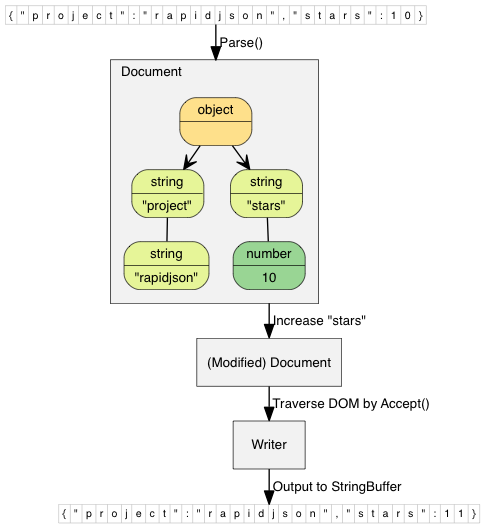
This simple example parses a JSON string into a document (DOM), make a simple modification of the DOM, and finally stringify the DOM to a JSON string.
// rapidjson/example/simpledom/simpledom.cpp`
#include "rapidjson/document.h"
#include "rapidjson/writer.h"
#include "rapidjson/stringbuffer.h"
#include <iostream>

using namespace rapidjson;

int main() {
    // 1. Parse a JSON string into DOM.
    const char* json = "{\"project\":\"rapidjson\",\"stars\":10}";
    Document d;
    d.Parse(json);

    // 2. Modify it by DOM.
    Value& s = d["stars"];
    s.SetInt(s.GetInt() + 1);

    // 3. Stringify the DOM
    StringBuffer buffer;
    Writer<StringBuffer> writer(buffer);
    d.Accept(writer);

    // Output {"project":"rapidjson","stars":11}
    std::cout << buffer.GetString() << std::endl;
    return 0;
}
Note that this example did not handle potential errors.
The following diagram shows the process.
More examples are available:
- DOM API
-
tutorial: Basic usage of DOM API.
-
SAX API
- simplereader: Dumps all SAX events while parsing a JSON by
Reader. - condense: A command line tool to rewrite a JSON, with all whitespaces removed.
- pretty: A command line tool to rewrite a JSON with indents and newlines by
PrettyWriter. - capitalize: A command line tool to capitalize strings in JSON.
- messagereader: Parse a JSON message with SAX API.
- serialize: Serialize a C++ object into JSON with SAX API.
-
jsonx: Implements a
JsonxWriterwhich stringify SAX events into JSONx (a kind of XML) format. The example is a command line tool which converts input JSON into JSONx format. -
Schema
-
schemavalidator : A command line tool to validate a JSON with a JSON schema.
-
Advanced
- prettyauto: A modified version of pretty to automatically handle JSON with any UTF encodings.
- parsebyparts: Implements an
AsyncDocumentParserwhich can parse JSON in parts, using C++11 thread. - filterkey: A command line tool to remove all values with user-specified key.
- filterkeydom: Same tool as above, but it demonstrates how to use a generator to populate a
Document.
常用命令(从 README 提取)
Tencent is pleased to support the open source community by making RapidJSON available.

Copyright (C) 2015 THL A29 Limited, a Tencent company, and Milo Yip.

Licensed under the MIT License (the "License"); you may not use this file except
in compliance with the License. You may obtain a copy of the License at

http://opensource.org/licenses/MIT

Unless required by applicable law or agreed to in writing, software distributed
under the License is distributed on an "AS IS" BASIS, WITHOUT WARRANTIES OR
CONDITIONS OF ANY KIND, either express or implied. See the License for the
specific language governing permissions and limitations under the License.
通用部署说明
- 下载源码并阅读 README
- 安装依赖(pip/npm/yarn 等)
- 配置环境变量(API Key、模型路径、数据库等)
- 启动服务并测试访问
- 上线建议:Nginx 反代 + HTTPS + 进程守护(systemd / pm2)
免责声明与版权说明
本文仅做开源项目整理与教程索引,源码版权归原作者所有,请遵循对应 License 合规使用。






暂无评论内容