



项目概述
pyenv 是一个简单易用的 Python 版本管理工具,帮助用户轻松切换和管理不同版本的 Python 环境,提高开发效率。
项目地址
https://github.com/pyenv/pyenv
项目页面预览
关键指标
- Stars:44055
- 主要语言:Roff
- License:MIT License
- 最近更新:2026-01-15T13:10:08Z
- 默认分支:master
本站高速下载(国内可用)
点击下载(本站镜像)
– SHA256:5dc080865f5047aa4db68d80d5bf1419e52dc2aface9f310164704338efafdc5
安装部署要点(README 精选)
Installation
D. Install Python build dependencies
Install Python build dependencies
before attempting to install a new Python version.
You can now begin using Pyenv.
Usage
Install additional Python versions
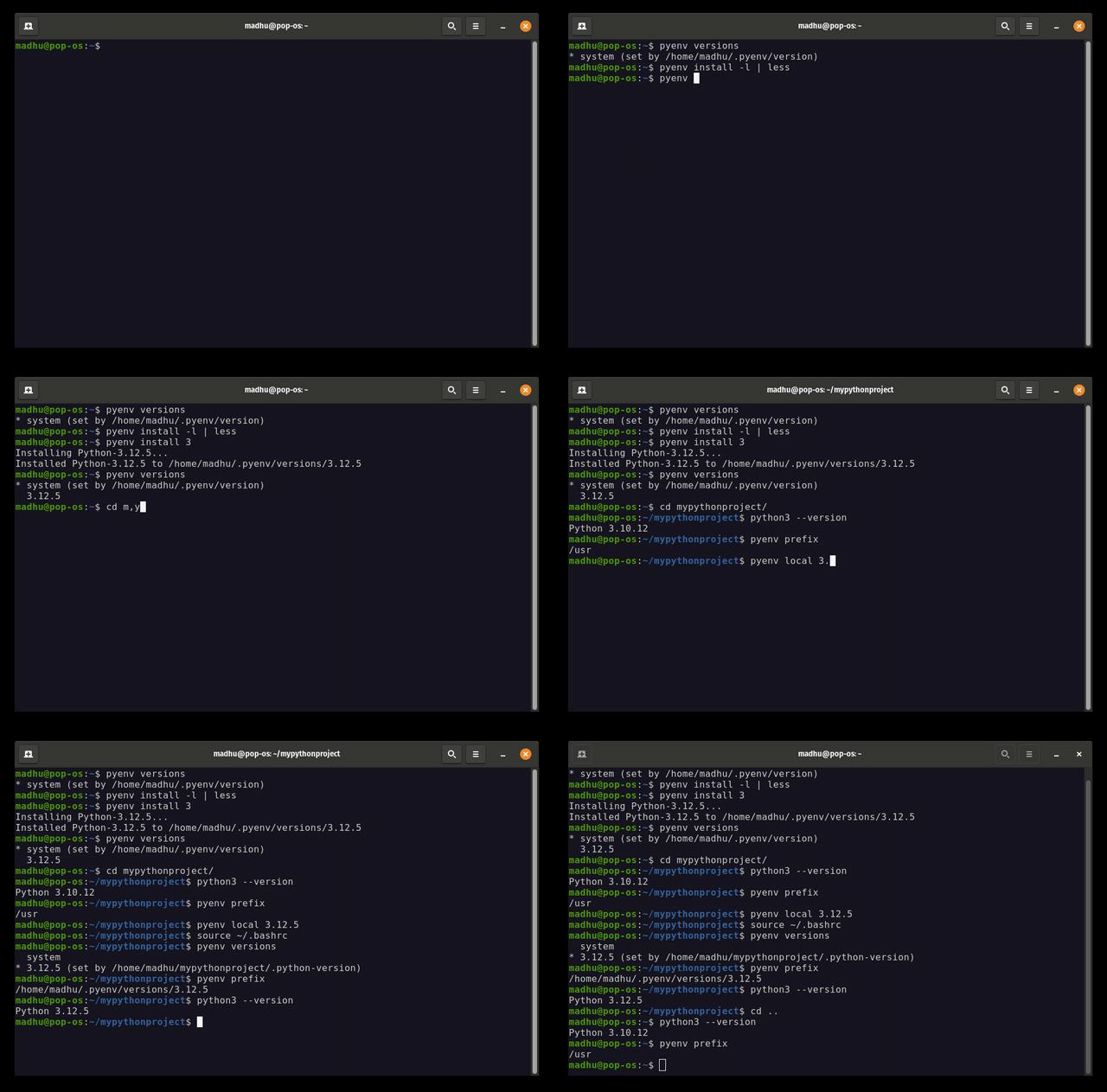
To install additional Python versions, use pyenv install.
For example, to download and install Python 3.10.4, run:
pyenv install 3.10.4
Running pyenv install -l gives the list of all available versions.
Notes about python releases
**NOTE:** Most Pyenv-provided Python releases are source releases and are built
from source as part of installation (that’s why you need Python build dependencies preinstalled).
You can pass options to Python’s `configure` and compiler flags to customize the build,
see [_Special environment variables_ in Python-Build’s README](plugins/python-build/README.md#special-environment-variables)
for details.
**NOTE:** If you are having trouble installing a Python version,
please visit the wiki page about
[Common Build Problems](https://github.com/pyenv/pyenv/wiki/Common-build-problems).
**NOTE:** If you want to use proxy for download, please set the `http_proxy` and `https_proxy`
environment variables.
**NOTE:** If you’d like a faster interpreter at the cost of longer build times,
see [_Building for maximum performance_ in Python-Build’s README](plugins/python-build/README.md#building-for-maximum-performance).
常用命令(从 README 提取)
curl -fsSL https://pyenv.run | bash

git clone https://github.com/pyenv/pyenv.git ~/.pyenv

cd ~/.pyenv && src/configure && make -C src
通用部署说明
- 下载源码并阅读 README
- 安装依赖(pip/npm/yarn 等)
- 配置环境变量(API Key、模型路径、数据库等)
- 启动服务并测试访问
- 上线建议:Nginx 反代 + HTTPS + 进程守护(systemd / pm2)
免责声明与版权说明
本文仅做开源项目整理与教程索引,源码版权归原作者所有,请遵循对应 License 合规使用。




暂无评论内容