



项目概述
py-spy 是一款用于 Python 程序的采样分析器,能够帮助开发者高效地分析性能瓶颈,优化代码运行效率。
项目地址
https://github.com/benfred/py-spy
项目页面预览
关键指标
- Stars:14836
- 主要语言:Rust
- License:MIT License
- 最近更新:2026-01-07T20:40:22Z
- 默认分支:master
本站高速下载(国内可用)
点击下载(本站镜像)
– SHA256:0fedb602fb037dfa9eeb9f61aaf7b3a3d81725b98227d6030d6fb34098ca61fe
安装部署要点(README 精选)
Installation
Prebuilt binary wheels can be installed from PyPI with:
pip install py-spy
You can also download prebuilt binaries from the GitHub Releases
Page.
If you’re a Rust user, py-spy can also be installed with: cargo install py-spy. Note this
builds py-spy from source and requires libunwind on Linux and Window, e.g.,
apt install libunwind-dev.
On macOS, py-spy is in Homebrew and
can be installed with brew install py-spy.
On Arch Linux, py-spy is in AUR and can be
installed with yay -S py-spy.
On Alpine Linux, py-spy is in testing repository and
can be installed with apk add py-spy --update-cache --repository http://dl-3.alpinelinux.org/alpine/edge/testing/ --allow-untrusted.
Usage
py-spy works from the command line and takes either the PID of the program you want to sample from
or the command line of the python program you want to run. py-spy has three subcommands
record, top and dump:
When do you need to run as sudo?
py-spy works by reading memory from a different python process, and this might not be allowed for security reasons depending on
your OS and system settings. In many cases, running as a root user (with sudo or similar) gets around these security restrictions.
OSX always requires running as root, but on Linux it depends on how you are launching py-spy and the system
security settings.
On Linux the default configuration is to require root permissions when attaching to a process that isn’t a child.
For py-spy this means you can profile without root access by getting py-spy to create the process
(py-spy record -- python myprogram.py) but attaching to an existing process by specifying a
PID will usually require root (sudo py-spy record --pid 123456).
You can remove this restriction on Linux by setting the ptrace_scope sysctl variable.
How do I run py-spy in Docker?
Running py-spy inside of a docker container will also usually bring up a permissions denied error even when running as root.
This error is caused by docker restricting the process_vm_readv system call we are using. This can
be overridden by setting
--cap-add SYS_PTRACE when starting the docker container.
Alternatively you can edit the docker-compose yaml file
your_service:
   cap_add:
     - SYS_PTRACE
Note that you’ll need to restart the docker container in order for this setting to take effect.
You can also use py-spy from the Host OS to profile a running process running inside the docker
container.
常用命令(从 README 提取)
pip install py-spy
Which will generate an interactive SVG file looking like:

You can change the file format to generate
[speedscope](https://github.com/jlfwong/speedscope) profiles or raw data with the ```--format``` parameter.
See ```py-spy record --help``` for information on other options including changing
the sampling rate, filtering to only include threads that hold the GIL, profiling native C extensions,
showing thread-ids, profiling subprocesses and more.
### top
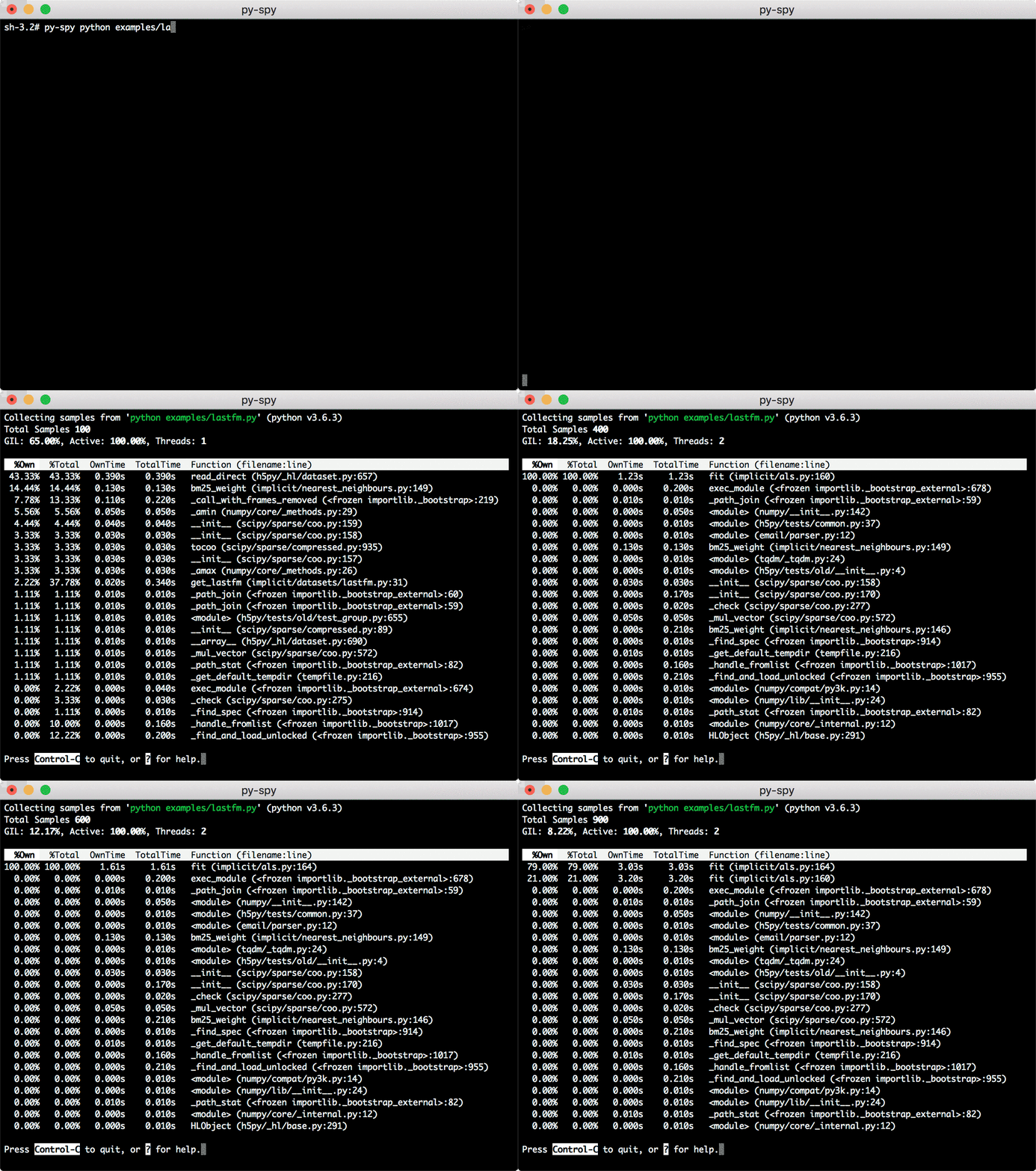
Top shows a live view of what functions are taking the most time in your python program, similar
to the Unix [top](https://linux.die.net/man/1/top) command. Running py-spy with:
will bring up a live updating high level view of your python program:
### dump
py-spy can also display the current call stack for each python thread with the ```dump``` command:
通用部署说明
- 下载源码并阅读 README
- 安装依赖(pip/npm/yarn 等)
- 配置环境变量(API Key、模型路径、数据库等)
- 启动服务并测试访问
- 上线建议:Nginx 反代 + HTTPS + 进程守护(systemd / pm2)
免责声明与版权说明
本文仅做开源项目整理与教程索引,源码版权归原作者所有,请遵循对应 License 合规使用。







暂无评论内容